
Clear quantity pricing for configurable WooCommerce products

PinkAgent
Give shoppers clear quantity pricing while your team builds, validates, and reuses pricing models for configurable WooCommerce products.
Features
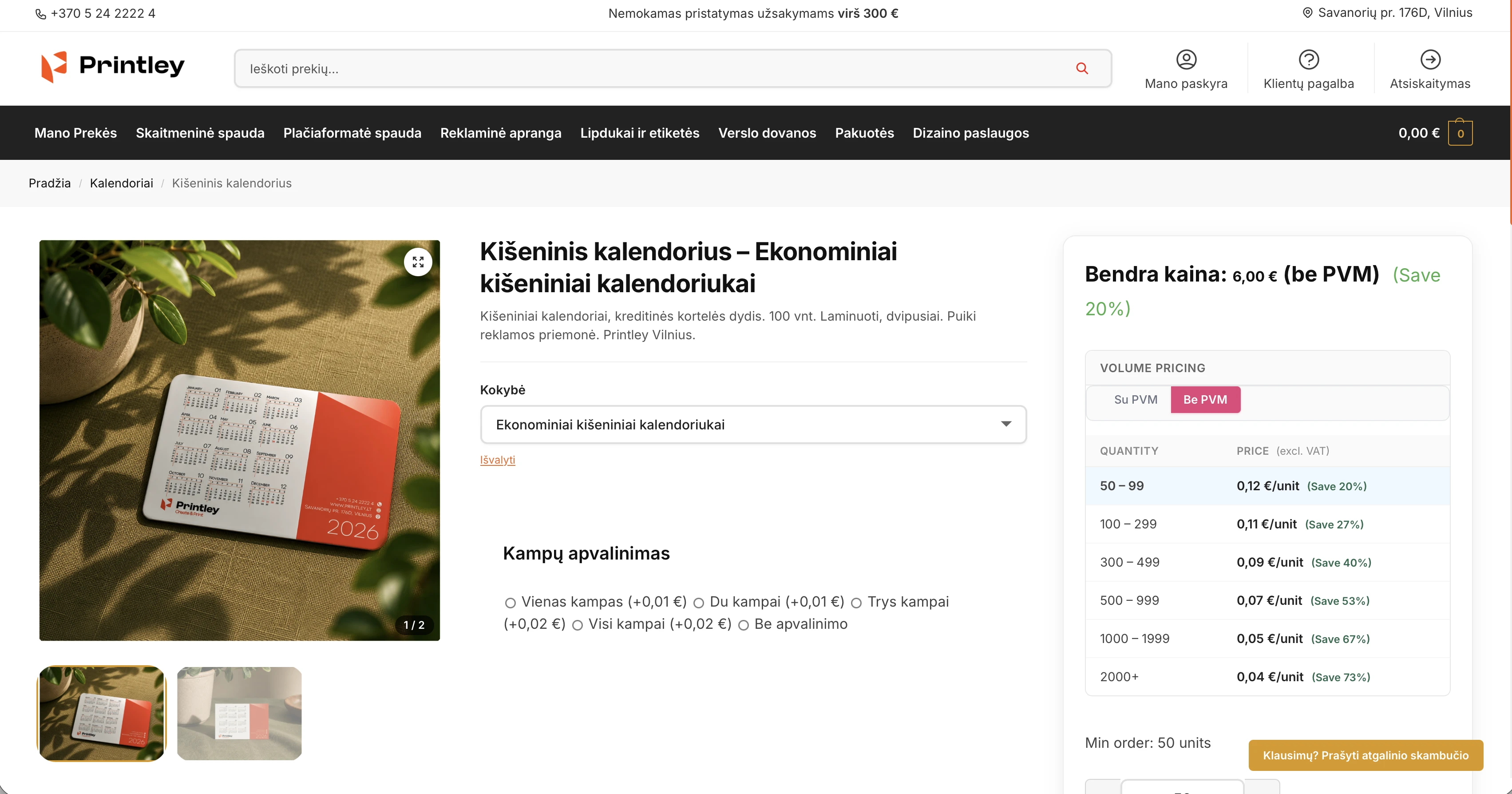
Clear volume tiers
Show shoppers quantity breakpoints and the price at each tier, so larger orders are easier to understand before checkout.
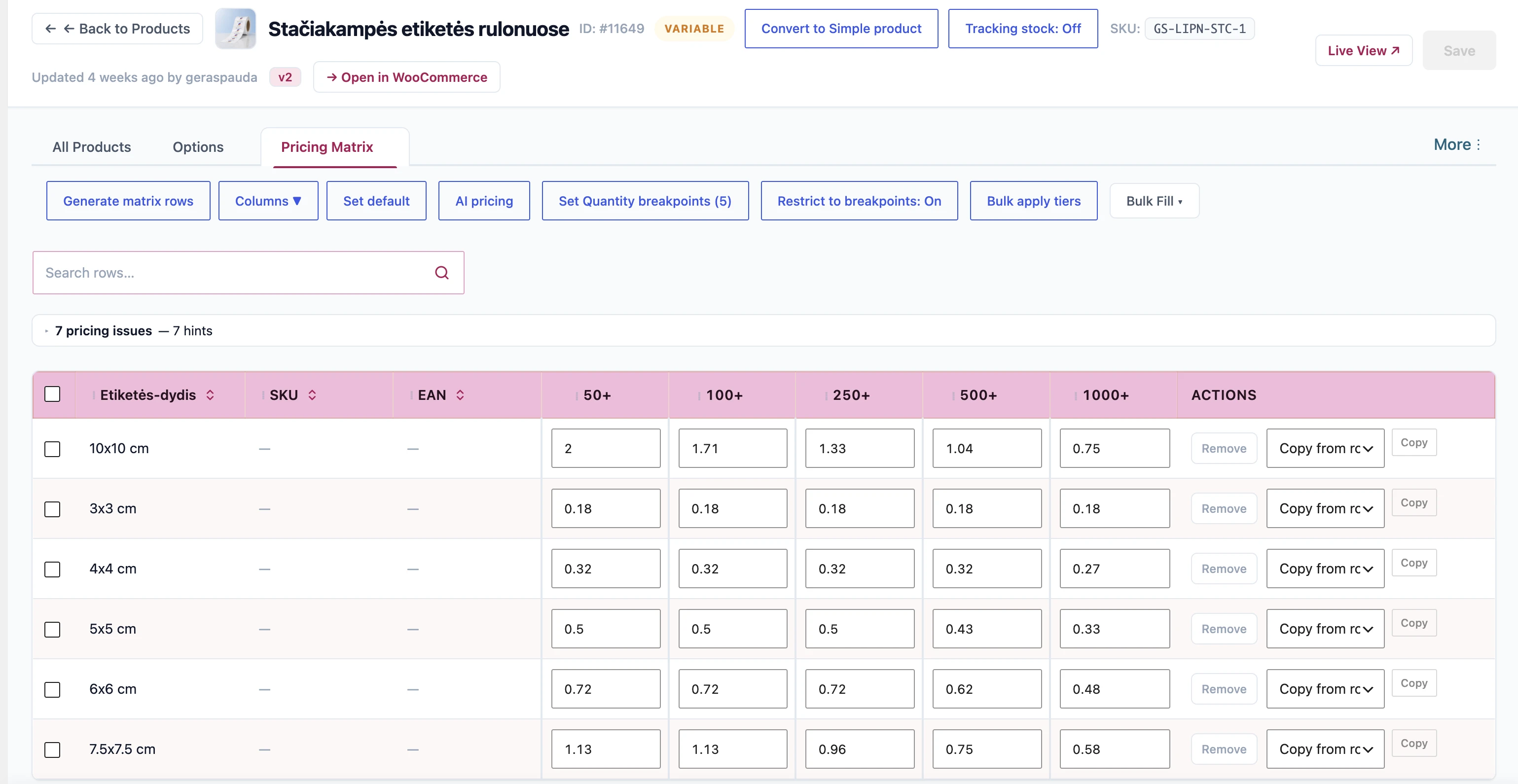
Configurable product pricing
Build pricing matrices for product variations and keep quantity-based prices aligned with the options a shopper selects.
Quantity limits when needed
Configure quantity breakpoints and purchase limits for products that need controlled order quantities.
Reusable pricing models
Define a pricing model once, then adapt it across products instead of rebuilding a calculation from scratch.
Validated publishing and history
Review pricing changes before publishing and use recorded versions to understand or restore a previous pricing state.
Optional AI-assisted proposals
Ask for pricing proposals when useful, then review the result and choose Apply yourself; PinkAgent never publishes AI output on its own.
Pricing control for WooCommerce stores
PinkAgent helps WooCommerce store owners present quantity pricing clearly while keeping the work behind each price controlled. Build tiers for a product, configure variations and quantity limits, and reuse the pricing models that fit how your store operates.
Before a change reaches shoppers, review the proposed pricing, validate it against your rules, and keep a version history for later reference or restoration. When you want help exploring a model, PinkAgent can offer optional AI-assisted proposals. You remain in control: review the proposal and apply it yourself.
Screenshots
What's new
v1.0.01.0.0
- Instant total price: "Bendra kaina" on the product page now updates immediately when the quantity or variation changes, computed from the pricing tiers already on the page — no more multi-second wait on a server round-trip. The server still recalculates in the background and silently corrects the display in the rare cases it differs (e.g. product-option price adjustments).
- Volume pricing table display toggle: a global setting (PinkAgent → Settings, default ON) hides the Volume Pricing table on product pages while everything that reads it keeps working — the dynamic total price, VAT-aware unit prices in the breakpoint quantity dropdown, and price recalculation. The Su/Be PVM VAT toggle stays visible above the price area. WP-Optimize page cache is purged automatically when the setting changes; other full-page cache plugins need a manual purge.
- Breakpoint-only quantity purchase: a per-product "Restrict to breakpoints" toggle (Quantity Limits tab, and an instant On/Off button in the Pricing Matrix toolbar next to Bulk apply tiers) replaces the free quantity input with a dropdown of the product's pricing-tier quantities — on the product page (VAT-aware unit price per option, per-variation sets on variable products) and on the classic cart page. Enforced server-side on classic add-to-cart (including merged repeat adds), cart updates, and block (Store API) checkout, with a checkout-time guard for anything that slips through; archive "Add to cart" buttons become product-page links when quantity 1 is not a breakpoint. A flagged product with no resolvable tiers keeps the free input — purchasing is never blocked.
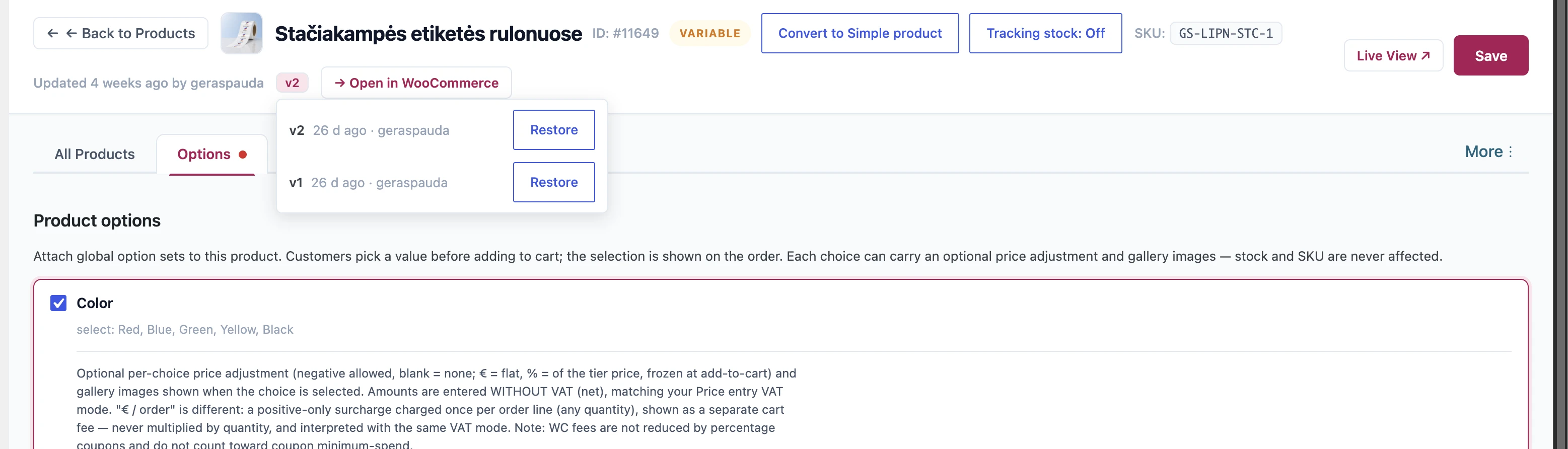
- Pricing version history: every editor Save records a numbered version of the product's full pricing state (rolling last 20). A "v{N}" badge in the editor header opens the history (who, when), and any version can be restored — the current state is saved as a new version first, so a restore is always undoable.
- Editor header: "Updated X ago" now shows who made the last update — "Updated X ago by {user}". Tracked on every editor save (including quantity-limits and stock-toggle changes); products last edited outside the editor fall back to the WordPress/WooCommerce editor user.
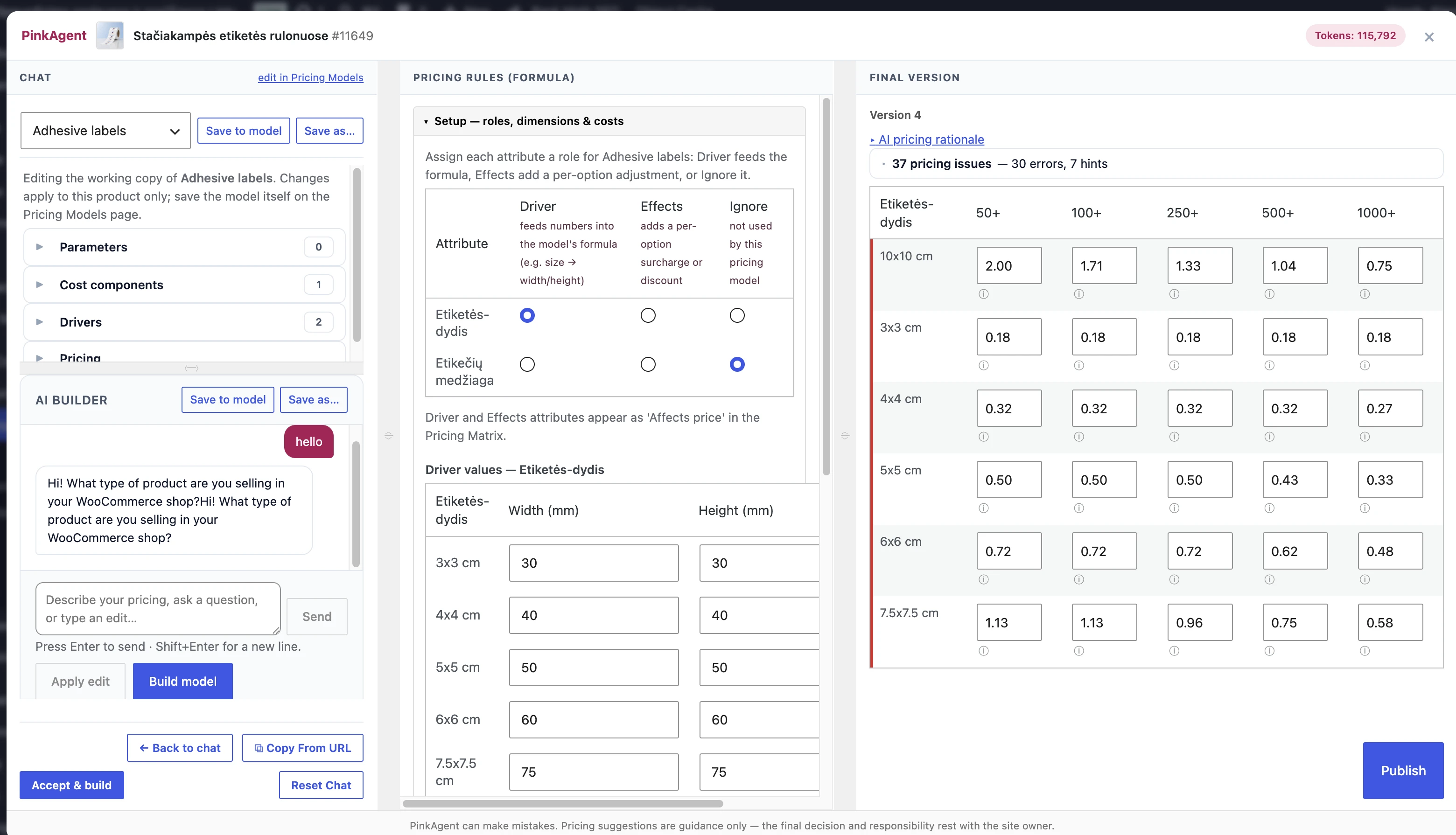
- AI pricing modal: "Save to model" and "Save as…" are also available right on the AI Builder header line — save the pricing model working copy without scrolling back up to the template bar.
- Safety: deleting the plugin no longer removes any data. All pricing matrices, tiers, fees, AI drafts, version history and logs are preserved on uninstall unless the new "Remove data on uninstall" setting (PinkAgent → Settings, default OFF) is enabled for that site — on a multisite network each site decides independently. This makes update-by-reinstall safe: previously, deleting the old plugin in the network admin permanently wiped pricing data on every site in the network.
- Fix: saving attributes no longer removes custom (non-WooCommerce-taxonomy) attributes from the product — the editor manages only its own attribute taxonomies and now leaves everything else untouched.
- Fix: when Generate attaches or promotes an attribute on the product, the Attributes tab now updates immediately (checkbox and terms), so a later Save can no longer undo what Generate just configured. In the rare case the AI build cannot auto-save attributes first, a visible notice is shown instead of skipping silently.
- Fix: Generate variations now works right after attaching or creating an attribute — no prior Save needed. Attributes attached in the Attributes tab (or created/attached from the Pricing Matrix and AI flows) used to exist only in the browser until Save All, so Generate failed with "Attribute does not exist on this product". Generate now attaches missing attributes to the product itself (as variation attributes, with the requested terms) and promotes attributes not yet marked "Used for variations". The AI build's attribute auto-save also no longer skips silently when a term is known only by name — terms are resolved on the server — so the Attributes tab stays in sync and a later Save can no longer strip terms added during an AI session.
- Fix: AI-built pricing matrices now create a WooCommerce variation for every matrix row. Previously a row whose attribute term was not yet assigned to the product (e.g. terms added during the AI session) silently got no variation — the option was missing from the product-page dropdown and not purchasable while the matrix looked complete. Generating variations now also assigns such terms to the product automatically, repairs rows pointing at deleted variations, and reports any row that genuinely cannot be built instead of showing success. Affected products are fixed by re-running Accept & build (or Generate) once — existing prices and variations are untouched.
- Fix: Set Qty/Price Rules tier prices no longer display as 0 after saving and reloading the editor (simple-product bulk tiers and per-variation tiers) — a follow-up save could previously wipe the stored price.
- Editor header: display the product ID next to the product title in the format `ID: #...`.
- Initial release: PinkAgent — tiered and wholesale pricing for WooCommerce with data-driven Pricing Model v2.
- Pricing Model v2 engine: user-defined parameters (scalar or quantity-banded), driver slots, ordered cost components (fixed per order, per unit, per batch, percentage, formula), margin or markup pricing block, minimum order price, and rounding step. Formulas run through a safe whitelist evaluator — no code execution.
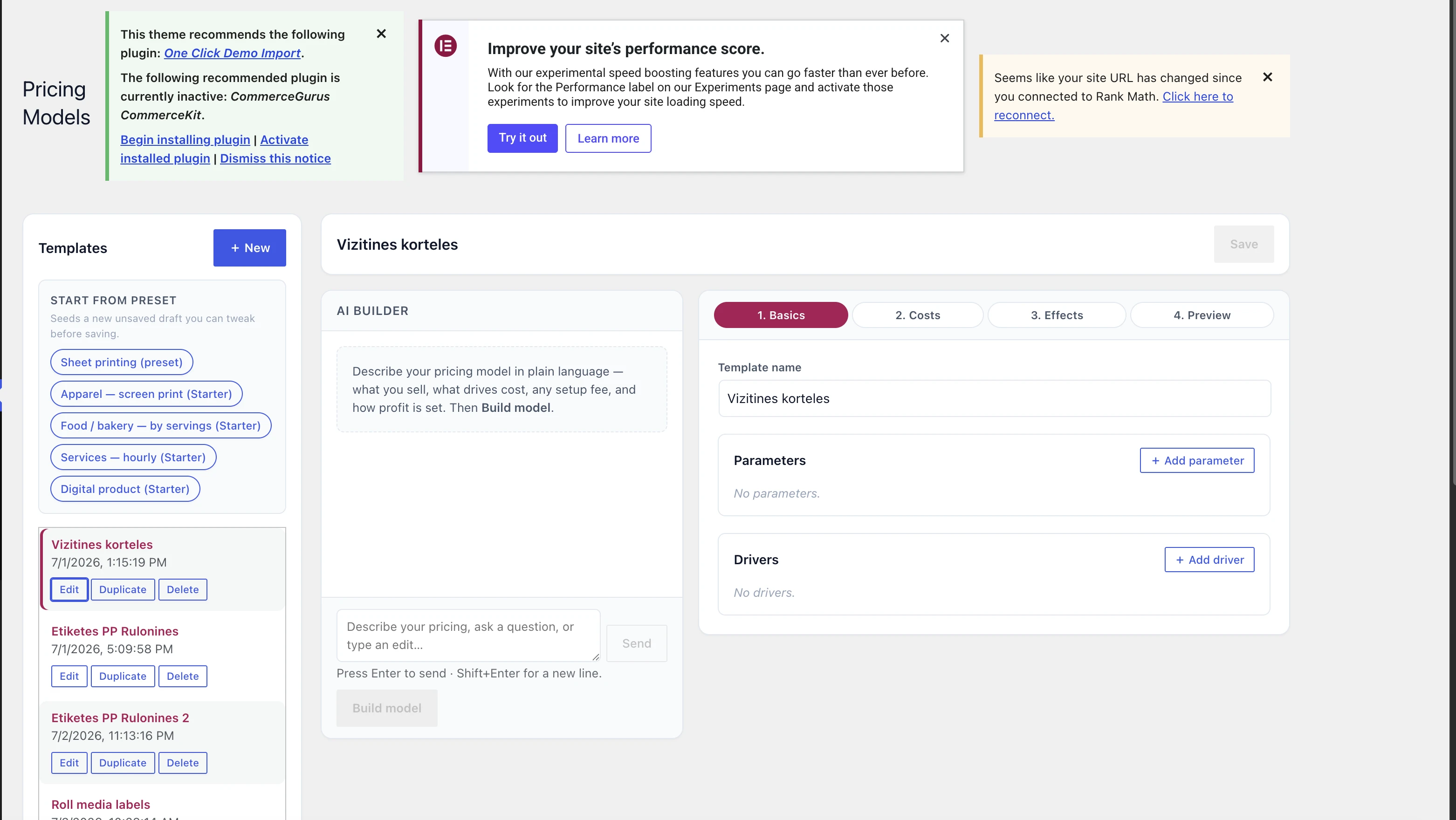
- Pricing Models admin page: chat-first template builder (English + Lithuanian) with a structured wizard, live price playground, versioned templates, duplicate, and usage-aware delete.
- AI assistance: template_builder chat mode builds or edits a pricing model via confirm-gated proposals; the product-editor chat guides binding a model to a product, can create attributes/terms/variations, and can create a brand-new pricing model right from the product chat. All AI output is sanitized, schema-validated, and dry-run checked before anything is applied.
- One-step price generation with AI review: Promote (and Accept & build) runs a single pipeline — the deterministic Local engine computes the whole matrix instantly from your pricing model, a sanity pass checks it (below-cost, thin-margin, minimum-order, quantity-discount monotonicity), and one short AI review call proposes corrections only for cells it disagrees with, each validated against the engine baseline (0.4x–3x band, cost floor) before merging. AI-corrected cells carry a badge with the AI's own reason; rejected corrections are listed, never silently applied. If the AI is slow or down, you still get the full engine matrix immediately with an "AI review unavailable" notice — an AI outage can never block pricing. Reload and reopening the editor never spend AI tokens (engine-only recompute / cached prices). Rows the engine cannot compute (no usable formula) fall back to grounded AI generation with the same server-side sanity checks. Prices stay fully editable before Publish.
- AI generation guardrails: one AI compute per product per 10 seconds (tunable via the `ppr_ai_compute_rate_limit` filter) — the lock is taken before the paid AI call so concurrent double-fires are blocked, and released if the review degraded so a retry is never throttled; a 240-row cap on the AI-generation fallback with a clear over-cap message; audit-log entries for reviewed, degraded, and failed AI generations. Reopening the editor never re-runs a paid AI call: cached AI prices are restored, and if attributes changed since they were generated you get an "AI prices may be outdated — Reload to recompute" notice instead of a silent overwrite.
- Accept & build generates the pricing formula via AI from the Setup selections alone — no chat conversation required; falls back to the selected template verbatim (with a notice) if the AI is unavailable. It then builds the price matrix right away through the same engine-computes/AI-reviews pipeline.
- Stop button on every AI chat: abort a slow assistant turn (or an in-flight suggestion) without losing the conversation — localized (English/Lithuanian), including an inline Stop right on the "Thinking…" line in both the product chat and the pricing-model builder chat.
- AI debug prompt log (opt-in, off by default): records every AI request and response — successes and failures — under PinkAgent → AI Debug with a full-body detail view, its own retention window (default 7 days, daily prune), and a nonce-gated clear-log button. The API bearer token is never stored.
- Product editor Setup: pick a pricing model, bind attribute terms to drivers (dimensions auto-parsed from term names), add per-term price effects, and edit the bound model's parameters, component rates, and margin/markup inline (edits stay on the product; the shop template is edited on the Pricing Models page). Compute and publish tiers through the existing pricing matrix.
- Pricing Model pane: collapsible parameter groups (Parameters, Cost components, Drivers, Pricing — tap anywhere on a group header to expand), plus the AI model builder chat right below the form in a resizable split view. An emitted model can be applied to the current product only or saved as a new reusable template. Every part of the bound model is editable in place — parameters and component rates, cost-component formulas and their type, driver definitions (add/rename/remove), and the margin/markup pricing block — and a "Save to model" button writes the changes straight back to the shared pricing model (or "Save as…" forks a new one); driver values are still bound per attribute term in Setup.
- Pricing Model pane builder chat remembers its conversation per pricing model: the thread survives switching back to the main chat, closing the modal, and reloading the page, and switching pricing models switches threads. Saving an authored model as a new template carries its conversation along. The footer "Reset Chat" is tab-aware — in the Pricing Model pane it clears only the current model's builder conversation (with a confirmation) and stays in the pane; in the main chat it remains the familiar full start-over and never touches builder conversations.
- Driver-values management in Setup: remove a term row from pricing (with confirm; the WooCommerce term is untouched and one click re-adds it) or add a new term inline — sizes typed like "25x25 cm" auto-fill their width/height driver values.
- Pricing Models page fully restyled to the plugin design system: template rail, chat + wizard split, live playground.
- Starter preset library: sheet printing, apparel, food/bakery, hourly services, and digital goods — editable starting points, not authoritative rates.
- The bundled sheet-printing preset reproduces the previous printing engine's prices exactly (golden-tested against frozen fixtures).
- Data safety: one-time backup of the existing pricing-template store on upgrade; published tier prices on legacy products are preserved and keep selling — editing such a product's prices requires binding a v2 pricing model (a notice explains this in the editor).
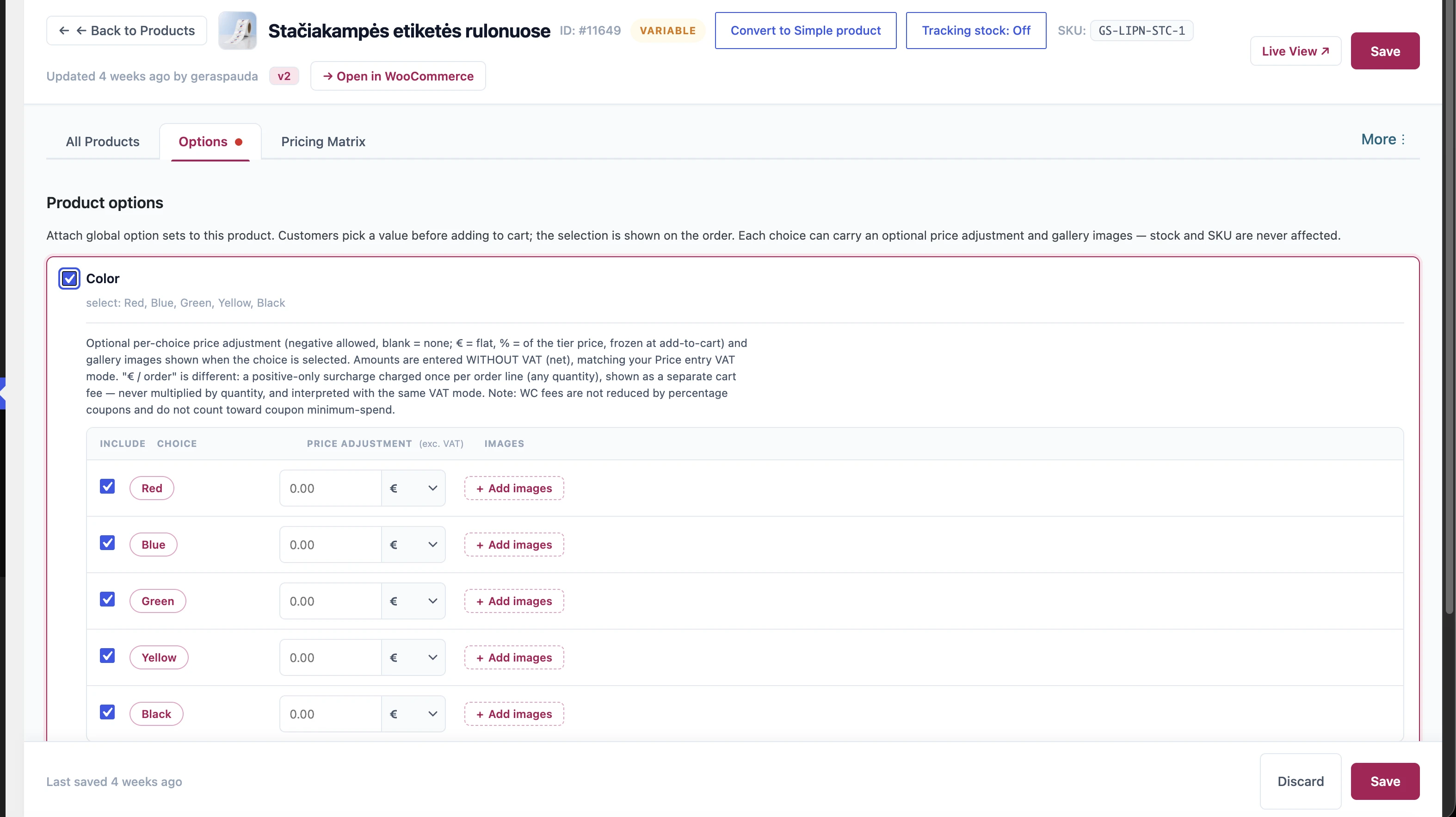
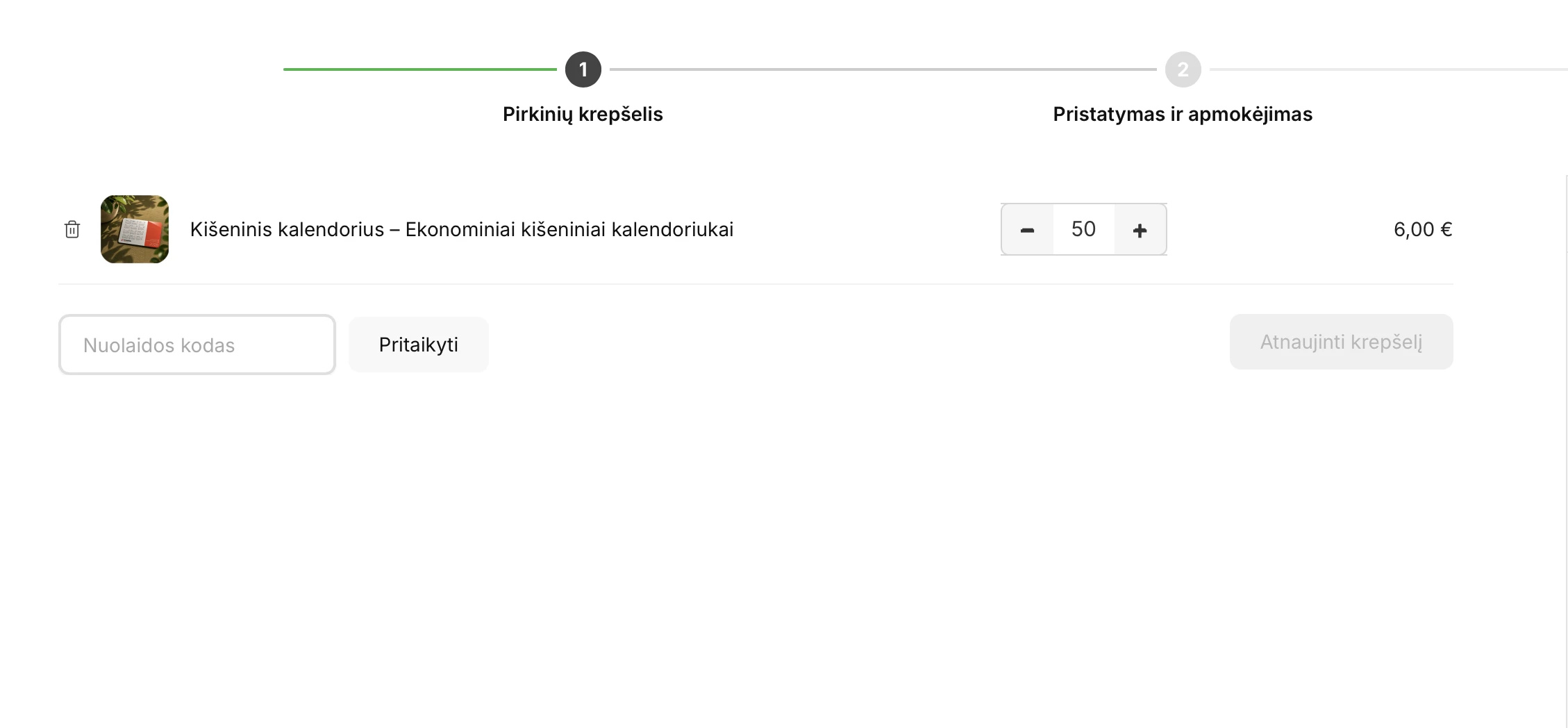
- Product Options: global reusable option sets (select, radio, checkbox, free text) managed under PinkAgent → Product Options and attached per product via the editor's Options tab. Required options block add-to-cart until filled; selections are snapshotted as plain text into the cart line, shown in cart/checkout (classic and blocks), on the admin order screen, and in order emails, and restored by "Order again". Shop-loop buttons for option products become "Select options" links. No effect on stock or SKU.
- Product Option price adjustments: each choice of an attached set can carry an optional signed price adjustment — flat euro amount (default) or a percent of the tier-resolved unit price (−100% to +1000%). The adjustment is shown beside the choice on the product page, resolved at add-to-cart against the current tier price, and frozen into the cart snapshot (later quantity or tier changes never silently re-price it); "Order again" re-derives percent adjustments at the then-current price.
- Product Option per-order surcharges: a third per-choice adjustment type — "€ / order" — charges a positive flat amount once per cart line no matter the quantity, surfaced as a separate named fee line ("Product: Choice — Value") in cart, checkout, and the placed order rather than being folded into the unit price. Amounts are entered net and taxed with the product's own tax class; quantity changes never change the fee; identical selections merge and pay once while distinct lines each pay; editing the amount later never re-prices carts already holding the item (a new add with the changed amount goes to its own line). Works with classic and block (Store API) checkout. Note: WooCommerce fees are not reduced by percentage coupons and don't count toward coupon minimum spend, and manually admin-created orders don't apply per-order fees.
- Matrix term reconciliation: deleting pricing-matrix rows and saving now detaches, per axis, every attribute term no remaining row uses — and prunes the freed auto-generated variations. Deleting the last rows cascades fully (an axis left with no terms is removed from the product as well). A term still used by a variation with order history is never detached silently: the save (and the standalone row delete) stops with a confirmation prompt and commits nothing until you confirm; confirming deletes the sales-bearing variation too (past orders keep their line-item snapshots). Terms still used by any other row always stay.
- AI publish reconciliation: publishing a pricing version whose formula rows were removed detaches the now-unused terms exactly the same way, and publishing rows that reference a brand-new term auto-creates and attaches that term so its variation can generate — no manual attribute editing in between.
- Natural variation ordering: product-page variation dropdowns now sort numerically-aware — 3x3, 4x4, 7.5x7.5, 10x10, 35x35 — instead of the old term-ID order. New plugin-created attributes persist WooCommerce's "Name (numeric)" ordering; existing attributes are covered by a runtime filter with no data migration.
- Product Option choice images: attach up to 10 WordPress media images to every choice of an attached set, per product, from the editor's Options tab. On the product page, selecting a choice appends its images to the product gallery and jumps to the first one; checkbox choices combine their images, and clearing the selection restores the original gallery. Works on classic themes and on the block Product Gallery (via a built-in fallback gallery with lightbox; if a WooCommerce update ever breaks that path, the shop keeps working and admins get a one-time notice). Cart and checkout lines show the chosen choice's first image as a small thumbnail (classic cart/checkout; order pages and emails stay text-only). Private or unpublished media never appears on the storefront.
- Product Option choice icons + icon display mode: attach one icon image per choice of a global option set (per-row media picker; renaming a choice keeps its icon) and choose how the set renders on the product page — Text (the classic dropdown/radio/checkbox) or Icon: a grid of clickable 64px icon-only swatches with the choice name (and any price adjustment) as a tooltip, a "selected choice" label beside the set name, and a bundled placeholder icon for choices without one. Swatches are keyboard-navigable and screen-reader labeled, submit exactly the same values as text mode (cart, orders, order-again, and price adjustments are unaffected), and private or deleted icon media falls back to the placeholder instead of leaking a URL.
- AI pricing modal: "Reset Chat" keeps the selected pricing model bound — after a reset, re-assigning the Setup roles re-enables "Accept & build" (previously the button could stay disabled until the modal was reopened).
- AI pricing modal: driver values (Width/Height) now auto-fill from size term names whenever the Driver role is assigned — in any order relative to picking the pricing model. Previously, assigning the role after the model was bound left the values empty, so the AI formula spec carried no dimensions and every Promote/Reload row failed as unpriceable.
- AI pricing modal: promoting or reloading a version whose pricing model has no cost components now shows one clear message ("add a cost component in the Pricing Model pane") instead of a full matrix of unpriceable red cells with a misleading hint; Accept & build warns immediately when it produces such a model.
- Product Options page redesigned to the plugin design system: option sets as a zebra list with type/required badge pills and outlined choice chips beside the add/edit form (two-panel layout like Pricing Models), option type picked via labeled cards, Enter in a choice adds the next one, and buttons follow the site's admin color scheme like the rest of the plugin. The editor's Options tab got the same treatment — option sets as cards with a pink attached state and required badges.
- AI pricing modal: reopening the modal restores the last computed price preview from the saved draft instead of re-running a compute — prices recompute only when you Promote a version or click Reload. Stale versions with Local prices recompute automatically on open so cached prices can't mislead; stale AI-priced versions keep their cached prices and show an "outdated — Reload to recompute" notice instead (AI prices are paid output and are never replaced implicitly).
- AI pricing: the AI generation call no longer pins a sampling temperature — some gateway upstream models reject non-default values with HTTP 400.
- AI pricing modal: versions built by "Accept & build" are labeled "AI-generated" (previously "Manual"), and rows that fail to price show an accurate notice — formula/driver-value problems get their own "couldn't be priced automatically" message and "no price" badge instead of the misleading "size is larger than the pricing sheet" copy.
- The row-actions menu (Edit / Quick Edit / Clone / Delete) on product lists is never cut off for rows near the bottom of the table — it now floats above the table and flips upward when there is no room below.
- Simple products show "Set Qty/Price Rules" as a visible tab next to All Products in the product editor — it's the primary pricing UI when there is no Pricing Matrix. Variable products keep it in the "More ⋮" menu; the More button highlights only for panels actually inside the menu.
- Out-of-range quantities always price from the sheet: a quantity below the first breakpoint is charged the first tier's rate (never the published base price, which holds the cheapest bulk rate), and a quantity above a capped last tier is charged that last tier's rate — identical on the product page and in the cart. The matrix editor hints when a sheet's breakpoints start above 1.
- Pricing Model column in product lists: both the PinkAgent → Products list and the editor's All-products tab show which pricing model template generated each product's price matrix (em-dash when none is bound; a muted raw id when the bound template was later deleted). The main list also gains a "Model:" filter — show only products bound to a specific template, or only unbound ones — composing with the existing Tiered/Matrix/Min-Max filters.
- Signed releases: updates are Ed25519-signed with version binding and anti-rollback verification.
- Variation dropdown unit price labels: optional setting (PinkAgent → Settings, default OFF) appends each variation's formatted unit price to frontend WooCommerce variation dropdown options. Price is shown only when a dropdown option maps to exactly one variation; ambiguous multi-variation options keep their original label. Request-local caching avoids repeated child-variation scans per page render.
- Matrix default combination: mark one row × quantity-breakpoint cell in the pricing matrix as the product default. Click "Set default" in the matrix toolbar, then click a price cell — a star badge marks the chosen cell and the toolbar shows the current default; re-set or clear it any time. On the storefront the product page pre-selects that variation (native WooCommerce default attributes) and pre-fills the quantity input with the chosen breakpoint (clamped to any configured min/max). A default whose row or breakpoint is later removed is cleared automatically; unrelated manual default attributes are preserved.
- Product Option per-choice include/exclude: each product can hide individual choices of an attached option set from the editor's Options tab (an "Include" checkbox per choice, checked by default). Excluded choices disappear from the product page and are rejected if forged into an add-to-cart request; leaving every choice checked stores nothing and shows them all (existing products are unaffected, no migration). Unchecking every choice of a set is blocked with a clear message — detach the set instead. Price adjustments and images for still-included choices are preserved.
- Price entry VAT mode: a shop-global setting (PinkAgent → Settings) declares whether the prices you type into PinkAgent — tiers, matrix, per-choice option adjustments, attribute fees — were entered With VAT (gross) or Without VAT (net). The VAT rate itself always comes from WooCommerce (product tax class + customer location). Default is "Without VAT (net)", so existing shops see no change on upgrade; switching to "With VAT" makes PinkAgent treat the entered numbers as already-inclusive without ever double-adding tax, on both tax-inclusive and tax-exclusive stores. Changing the mode does not alter any stored price — only how it is interpreted — and the admin is warned on change. This mode also decides which figure the product page shows first (gross when With VAT, net when Without VAT); customers can still flip it with the Su/Be PVM toggle, and the volume pricing table's Price header shows a matching "(incl. VAT)" / "(excl. VAT)" suffix (translatable per WordPress locale). In the product editor, the Set Qty/Price Rules price column header shows the current mode as "inc. VAT" / "exc. VAT" so you always know how the price you type is interpreted.
- Settings consolidated: every plugin setting now lives on PinkAgent → Settings. The separate WooCommerce → Settings → PinkAgent tab has been removed; the Target margin, Rounding step and Minimum order price options moved onto the native page unchanged (same stored values, no migration).
- Bulk price auto-fill: adding a new row under Set Qty/Price Rules → Global (Bulk) quantity price settings pre-fills the 1 Pcs Price field with the product's WooCommerce Regular price, converted to the current price-entry VAT mode (net when Without VAT, gross when With VAT). It's a starting point you can edit; products with no regular price start the row at 0, and existing saved rows are never changed.
Requirements
- Requires WordPress
- 5.8
- Tested up to
- 6.5
- Requires PHP
- 7.4
- Requires
- WooCommerce 6.0+
Get PinkAgent
Current release: v1.0.0